Article Purpose
The objective of this article is to explore various edge detection algorithms. The types of edge detection discussed are: Laplacian, Laplacian of Gaussian, Sobel, Prewitt and Kirsch. All instances are implemented by means of Image Convolution.
Sample source code
This article is accompanied by a sample source code Visual Studio project which is available for download here.

Using the Sample Application
The concepts explored in this article can be easily replicated by making use of the Sample Application, which forms part of the associated sample source code accompanying this article.
When using the Image Edge Detection sample application you can specify a input/source image by clicking the Load Image button. The dropdown combobox towards the bottom middle part of the screen relates the various edge detection methods discussed.
If desired a user can save the resulting edge detection image to the local file system by clicking the Save Image button.
The following image is screenshot of the Image Edge Detection sample application in action:

Edge Detection
A good description of edge detection forms part of the main Edge Detection article on Wikipedia:
Edge detection is the name for a set of mathematical methods which aim at identifying points in a digital image at which the image brightness changes sharply or, more formally, has discontinuities. The points at which image brightness changes sharply are typically organized into a set of curved line segments termed edges. The same problem of finding discontinuities in 1D signals is known as step detection and the problem of finding signal discontinuities over time is known as change detection. Edge detection is a fundamental tool in image processing, machine vision and computer vision, particularly in the areas of feature detection and feature extraction.
Image Convolution
A good introduction article to Image Convolution can be found at: http://homepages.inf.ed.ac.uk/rbf/HIPR2/convolve.htm. From the article we learn the following:
Convolution is a simple mathematical operation which is fundamental to many common image processing operators. Convolution provides a way of `multiplying together’ two arrays of numbers, generally of different sizes, but of the same dimensionality, to produce a third array of numbers of the same dimensionality. This can be used in image processing to implement operators whose output pixel values are simple linear combinations of certain input pixel values.
In an image processing context, one of the input arrays is normally just a graylevel image. The second array is usually much smaller, and is also two-dimensional (although it may be just a single pixel thick), and is known as the kernel.
Single Matrix Convolution
The sample source code implements the ConvolutionFilter method, an extension method targeting the Bitmap class. The ConvolutionFilter method is intended to apply a user defined matrix and optionally covert an image to grayscale. The implementation as follows:
private static Bitmap ConvolutionFilter(Bitmap sourceBitmap,
                                     double[,] filterMatrix,
                                          double factor = 1,
                                               int bias = 0,
                                     bool grayscale = false)
{
    BitmapData sourceData =
                   sourceBitmap.LockBits(new Rectangle(0, 0,
                   sourceBitmap.Width, sourceBitmap.Height),
                                     ImageLockMode.ReadOnly,
                                PixelFormat.Format32bppArgb);


    byte[] pixelBuffer = new byte[sourceData.Stride *
                                  sourceData.Height];


    byte[] resultBuffer = new byte[sourceData.Stride *
                                   sourceData.Height];


    Marshal.Copy(sourceData.Scan0, pixelBuffer, 0,
                               pixelBuffer.Length);


    sourceBitmap.UnlockBits(sourceData);


    if(grayscale == true)
    {
        float rgb = 0;


        for(int k = 0; k < pixelBuffer.Length; k += 4)
        {
            rgb = pixelBuffer[k] * 0.11f;
            rgb += pixelBuffer[k + 1] * 0.59f;
            rgb += pixelBuffer[k + 2] * 0.3f;


            pixelBuffer[k] = (byte)rgb;
            pixelBuffer[k + 1] = pixelBuffer[k];
            pixelBuffer[k + 2] = pixelBuffer[k];
            pixelBuffer[k + 3] = 255;
        }
    }


    double blue = 0.0;
    double green = 0.0;
    double red = 0.0;


    int filterWidth = filterMatrix.GetLength(1);
    int filterHeight = filterMatrix.GetLength(0);


    int filterOffset = (filterWidth-1) / 2;
    int calcOffset = 0;


    int byteOffset = 0;


    for(int offsetY = filterOffset; offsetY <
        sourceBitmap.Height - filterOffset; offsetY++)
    {
        for(int offsetX = filterOffset; offsetX <
            sourceBitmap.Width - filterOffset; offsetX++)
        {
            blue = 0;
            green = 0;
            red = 0;


            byteOffset = offsetY *
                         sourceData.Stride +
                         offsetX * 4;


            for(int filterY = -filterOffset;
                filterY <= filterOffset; filterY++)
            {
                for(int filterX = -filterOffset;
                    filterX <= filterOffset; filterX++)
               {


                   calcOffset = byteOffset +
                                (filterX * 4) +
                                (filterY * sourceData.Stride);


                   blue += (double)(pixelBuffer[calcOffset]) *
                           filterMatrix[filterY + filterOffset,
                                        filterX + filterOffset];


                   green += (double)(pixelBuffer[calcOffset+1]) *
                            filterMatrix[filterY + filterOffset,
                                         filterX + filterOffset];


                   red += (double)(pixelBuffer[calcOffset+2]) *
                          filterMatrix[filterY + filterOffset,
                                       filterX + filterOffset];
                }
            }


            blue = factor * blue + bias;
            green = factor * green + bias;
            red = factor * red + bias;


            if(blue > 255)
            { blue = 255;}
            else if(blue < 0)
            { blue = 0;}


            if(green > 255)
            { green = 255;}
            else if(green < 0)
            { green = 0;}


            if(red > 255)
            { red = 255;}
            else if(red < 0)
            { red = 0;}


            resultBuffer[byteOffset] = (byte)(blue);
            resultBuffer[byteOffset + 1] = (byte)(green);
            resultBuffer[byteOffset + 2] = (byte)(red);
            resultBuffer[byteOffset + 3] = 255;
        }
    }


    Bitmap resultBitmap = new Bitmap(sourceBitmap.Width,
                                    sourceBitmap.Height);


    BitmapData resultData =
               resultBitmap.LockBits(new Rectangle(0, 0,
               resultBitmap.Width, resultBitmap.Height),
                                ImageLockMode.WriteOnly,
                            PixelFormat.Format32bppArgb);


    Marshal.Copy(resultBuffer, 0, resultData.Scan0,
                               resultBuffer.Length);
    resultBitmap.UnlockBits(resultData);


    return resultBitmap;
}
Horizontal and Vertical Matrix Convolution
The ConvolutionFilter extension method has been overloaded to accept two matrices, representing a vertical matrix and a horizontal matrix. The implementation as follows:
public static Bitmap ConvolutionFilter(this Bitmap sourceBitmap,
                                        double[,] xFilterMatrix,
                                        double[,] yFilterMatrix,
                                              double factor = 1,
                                                   int bias = 0,
                                         bool grayscale = false)
{
    BitmapData sourceData =
                   sourceBitmap.LockBits(new Rectangle(0, 0,
                   sourceBitmap.Width, sourceBitmap.Height),
                                     ImageLockMode.ReadOnly,
                                PixelFormat.Format32bppArgb);


    byte[] pixelBuffer = new byte[sourceData.Stride *
                                  sourceData.Height];


    byte[] resultBuffer = new byte[sourceData.Stride *
                                   sourceData.Height];


    Marshal.Copy(sourceData.Scan0, pixelBuffer, 0,
                               pixelBuffer.Length);


    sourceBitmap.UnlockBits(sourceData);


    if (grayscale == true)
    {
        float rgb = 0;


        for (int k = 0; k < pixelBuffer.Length; k += 4)
        {
            rgb = pixelBuffer[k] * 0.11f;
            rgb += pixelBuffer[k + 1] * 0.59f;
            rgb += pixelBuffer[k + 2] * 0.3f;


            pixelBuffer[k] = (byte)rgb;
            pixelBuffer[k + 1] = pixelBuffer[k];
            pixelBuffer[k + 2] = pixelBuffer[k];
            pixelBuffer[k + 3] = 255;
        }
    }


    double blueX = 0.0;
    double greenX = 0.0;
    double redX = 0.0;


    double blueY = 0.0;
    double greenY = 0.0;
    double redY = 0.0;


    double blueTotal = 0.0;
    double greenTotal = 0.0;
    double redTotal = 0.0;


    int filterOffset = 1;
    int calcOffset = 0;


    int byteOffset = 0;


    for (int offsetY = filterOffset; offsetY <
        sourceBitmap.Height - filterOffset; offsetY++)
    {
        for (int offsetX = filterOffset; offsetX <
            sourceBitmap.Width - filterOffset; offsetX++)
        {
            blueX = greenX = redX = 0;
            blueY = greenY = redY = 0;


            blueTotal = greenTotal = redTotal = 0.0;


            byteOffset = offsetY *
                         sourceData.Stride +
                         offsetX * 4;


            for (int filterY = -filterOffset;
                filterY <= filterOffset; filterY++)
            {
                for (int filterX = -filterOffset;
                    filterX <= filterOffset; filterX++)
                {
                    calcOffset = byteOffset +
                                 (filterX * 4) +
                                 (filterY * sourceData.Stride);


                    blueX += (double)
                              (pixelBuffer[calcOffset]) *
                              xFilterMatrix[filterY +
                                            filterOffset,
                                            filterX +
                                            filterOffset];


                    greenX += (double)
                          (pixelBuffer[calcOffset + 1]) *
                              xFilterMatrix[filterY +
                                            filterOffset,
                                            filterX +
                                            filterOffset];


                    redX += (double)
                          (pixelBuffer[calcOffset + 2]) *
                              xFilterMatrix[filterY +
                                            filterOffset,
                                            filterX +
                                            filterOffset];


                    blueY += (double)
                              (pixelBuffer[calcOffset]) *
                              yFilterMatrix[filterY +
                                            filterOffset,
                                            filterX +
                                            filterOffset];


                    greenY += (double)
                          (pixelBuffer[calcOffset + 1]) *
                              yFilterMatrix[filterY +
                                            filterOffset,
                                            filterX +
                                            filterOffset];


                    redY += (double)
                          (pixelBuffer[calcOffset + 2]) *
                              yFilterMatrix[filterY +
                                            filterOffset,
                                            filterX +
                                            filterOffset];
                }
            }


            blueTotal = Math.Sqrt((blueX * blueX) +
                                  (blueY * blueY));


            greenTotal = Math.Sqrt((greenX * greenX) +
                                   (greenY * greenY));


            redTotal = Math.Sqrt((redX * redX) +
                                 (redY * redY));


            if (blueTotal > 255)
            { blueTotal = 255; }
            else if (blueTotal < 0)
            { blueTotal = 0; }


            if (greenTotal > 255)
            { greenTotal = 255; }
            else if (greenTotal < 0)
            { greenTotal = 0; }


            if (redTotal > 255)
            { redTotal = 255; }
            else if (redTotal < 0)
            { redTotal = 0; }


            resultBuffer[byteOffset] = (byte)(blueTotal);
            resultBuffer[byteOffset + 1] = (byte)(greenTotal);
            resultBuffer[byteOffset + 2] = (byte)(redTotal);
            resultBuffer[byteOffset + 3] = 255;
        }
    }


    Bitmap resultBitmap = new Bitmap(sourceBitmap.Width,
                                     sourceBitmap.Height);


    BitmapData resultData =
               resultBitmap.LockBits(new Rectangle(0, 0,
               resultBitmap.Width, resultBitmap.Height),
                                ImageLockMode.WriteOnly,
                            PixelFormat.Format32bppArgb);


    Marshal.Copy(resultBuffer, 0, resultData.Scan0,
                               resultBuffer.Length);
    resultBitmap.UnlockBits(resultData);


    return resultBitmap;
}
Original Sample Image
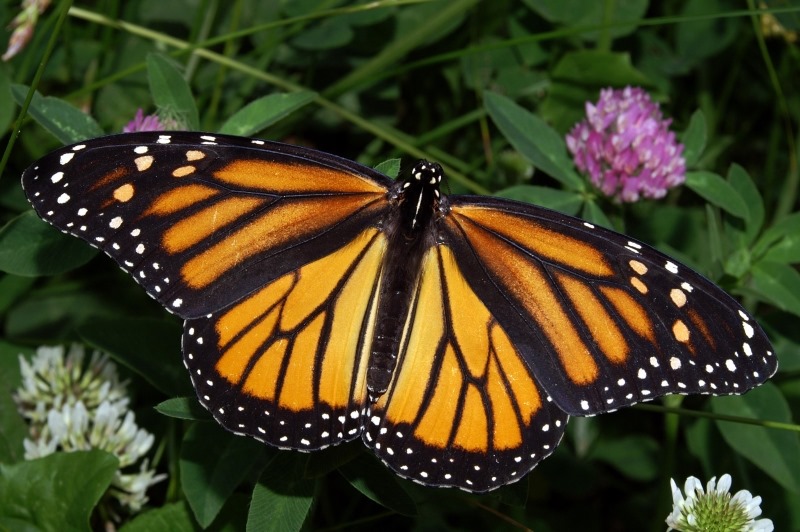
The original source image used to create all of the edge detection sample images in this article has been licensed under the Creative Commons Attribution-Share Alike 3.0 Unported, 2.5 Generic, 2.0 Generic and 1.0 Generic license. The original image is attributed to Kenneth Dwain Harrelson and can be downloaded from Wikipedia.
Laplacian Edge Detection
The Laplacian method of edge detection counts as one of the commonly used edge detection implementations. From Wikipedia we gain the following definition:
Discrete Laplace operator is often used in image processing e.g. in edge detection and motion estimation applications. The discrete Laplacian is defined as the sum of the second derivatives Laplace operator Coordinate expressions and calculated as sum of differences over the nearest neighbours of the central pixel.
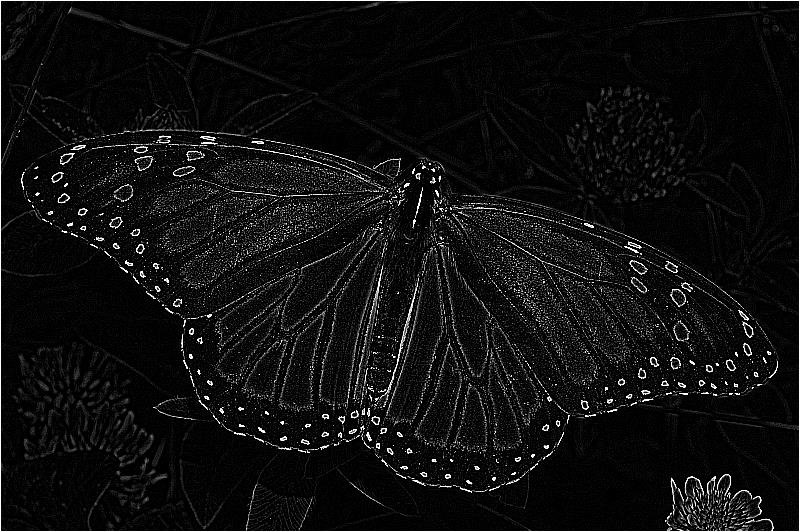
A number of matrix/kernel variations may be applied with results ranging from slight to fairly pronounced. In the following sections of this article we explore two common matrix implementations, 3×3 and 5×5.
Laplacian 3×3
When implementing a 3×3 Laplacian matrix you will notice little difference between colour and grayscale result images.
public static Bitmap
Laplacian3x3Filter(this Bitmap sourceBitmap,
                      bool grayscale = true)
{
    Bitmap resultBitmap =
           ExtBitmap.ConvolutionFilter(sourceBitmap,
                                Matrix.Laplacian3x3,
                                  1.0, 0, grayscale);


    return resultBitmap;
}
public static double[,] Laplacian3x3
{
   get
   {
       return new double[,]
       { { -1, -1, -1, },
         { -1,  8, -1, },
         { -1, -1, -1, }, };
   }
}
Laplacian 3×3

Laplacian 3×3 Grayscale
Laplacian 5×5
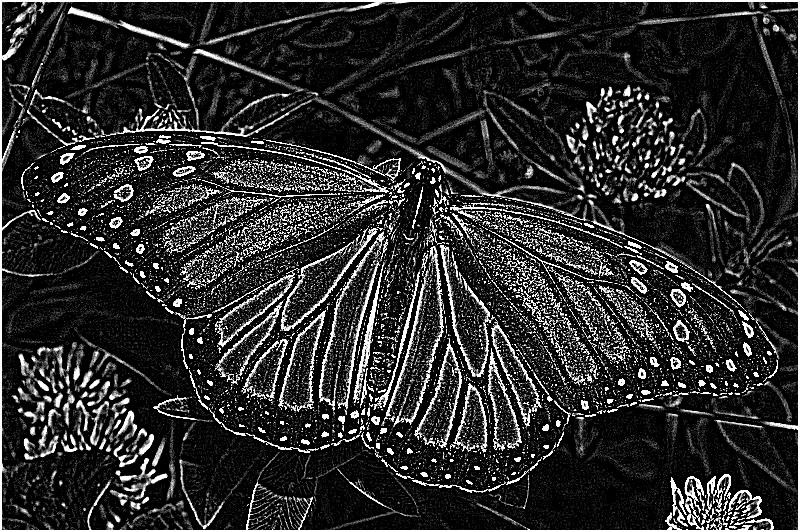
The 5×5 Laplacian matrix produces result images with a noticeable difference between colour and grayscale images. The detected edges are expressed in a fair amount of fine detail, although the Laplacian matrix has a tendency to be sensitive to image noise.
public static Bitmap
Laplacian5x5Filter(this Bitmap sourceBitmap,
                      bool grayscale = true)
{
    Bitmap resultBitmap =
           ExtBitmap.ConvolutionFilter(sourceBitmap,
                                Matrix.Laplacian5x5,
                                  1.0, 0, grayscale);


    return resultBitmap;
}
public static double[,] Laplacian5x5
{
    get
    {
       return new double[,]
       { { -1, -1, -1, -1, -1, },
         { -1, -1, -1, -1, -1, },
         { -1, -1, 24, -1, -1, },
         { -1, -1, -1, -1, -1, },
         { -1, -1, -1, -1, -1  } };
    }
}
Laplacian 5×5

Laplacian 5×5 Grayscale
Laplacian of Gaussian
The Laplacian of Gaussian (LoG) is a common variation of the Laplacian filter. Laplacian of Gaussian is intended to counter the noise sensitivity of the regular Laplacian filter.
Laplacian of Gaussian attempts to remove image noise by implementing image smoothing by means of a Gaussian blur. In order to optimize performance we can calculate a single matrix representing a Gaussian blur and Laplacian matrix.
public static Bitmap
LaplacianOfGaussian(this Bitmap sourceBitmap)
{
    Bitmap resultBitmap =
           ExtBitmap.ConvolutionFilter(sourceBitmap,
                         Matrix.LaplacianOfGaussian,
                                       1.0, 0, true);


    return resultBitmap;
}
public static double[,] LaplacianOfGaussian
{
    get
    {
        return new double[,]
        { {  0,  0, -1,  0,  0 },
          {  0, -1, -2, -1,  0 },
          { -1, -2, 16, -2, -1 },
          {  0, -1, -2, -1,  0 },
          {  0,  0, -1,  0,  0 } };
    }
}
Laplacian of Gaussian

Laplacian (3×3) of Gaussian (3×3)
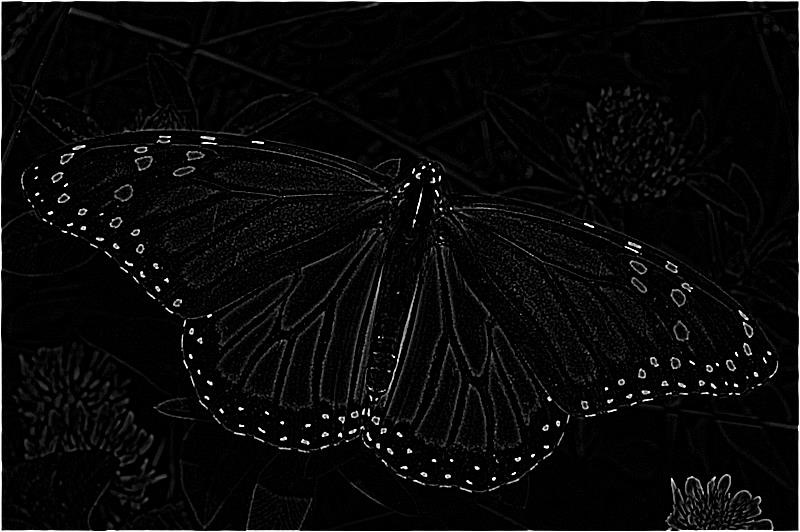
Different matrix variations can be combined in an attempt to produce results best suited to the input image. In this case we first apply a 3×3 Gaussian blur followed by a 3×3 Laplacian filter.
public static Bitmap
Laplacian3x3OfGaussian3x3Filter(this Bitmap sourceBitmap)
{
    Bitmap resultBitmap =
           ExtBitmap.ConvolutionFilter(sourceBitmap,
                                 Matrix.Gaussian3x3,
                                1.0 / 16.0, 0, true);


    resultBitmap = ExtBitmap.ConvolutionFilter(resultBitmap,
                         Matrix.Laplacian3x3, 1.0, 0, false);


    return resultBitmap;
}
public static double[,] Laplacian3x3
{
   get
   {
       return new double[,]
       { { -1, -1, -1, },
         { -1,  8, -1, },
         { -1, -1, -1, }, };
   }
}
public static double[,] Gaussian3x3
{
   get
   {
       return new double[,]
       { { 1, 2, 1, },
         { 2, 4, 2, },
         { 1, 2, 1, } };
   }
}
Laplacian 3×3 Of Gaussian 3×3
Laplacian (3×3) of Gaussian (5×5 – Type 1)
In this scenario we apply a variation of a 5×5 Gaussian blur followed by a 3×3 Laplacian filter.
public static Bitmap
Laplacian3x3OfGaussian5x5Filter1(this Bitmap sourceBitmap)
{
    Bitmap resultBitmap =
           ExtBitmap.ConvolutionFilter(sourceBitmap,
                            Matrix.Gaussian5x5Type1,
                               1.0 / 159.0, 0, true);


    resultBitmap = ExtBitmap.ConvolutionFilter(resultBitmap,
                         Matrix.Laplacian3x3, 1.0, 0, false);


    return resultBitmap;
}
public static double[,] Laplacian3x3
{
   get
   {
       return new double[,]
       { { -1, -1, -1, },
         { -1,  8, -1, },
         { -1, -1, -1, }, };
   }
}
public static double[,] Gaussian5x5Type1
{
   get
   {
       return new double[,]
       { { 2, 04, 05, 04, 2 },
         { 4, 09, 12, 09, 4 },
         { 5, 12, 15, 12, 5 },
         { 4, 09, 12, 09, 4 },
         { 2, 04, 05, 04, 2 }, };
   }
}
Laplacian 3×3 Of Gaussian 5×5 – Type 1

Laplacian (3×3) of Gaussian (5×5 – Type 2)
The following implementation is very similar to the previous implementation. Applying a variation of a 5×5 Gaussian blur results in slight differences.
public static Bitmap
Laplacian3x3OfGaussian5x5Filter2(this Bitmap sourceBitmap)
{
    Bitmap resultBitmap =
           ExtBitmap.ConvolutionFilter(sourceBitmap,
                            Matrix.Gaussian5x5Type2,
                               1.0 / 256.0, 0, true);


    resultBitmap = ExtBitmap.ConvolutionFilter(resultBitmap,
                         Matrix.Laplacian3x3, 1.0, 0, false);


    return resultBitmap;
}
public static double[,] Laplacian3x3
{
   get
   {
       return new double[,]
       { { -1, -1, -1, },
         { -1,  8, -1, },
         { -1, -1, -1, }, };
   }
}
public static double[,] Gaussian5x5Type2
{
   get
   {
       return new double[,]
       { {  1,   4,  6,  4,  1 },
         {  4,  16, 24, 16,  4 },
         {  6,  24, 36, 24,  6 },
         {  4,  16, 24, 16,  4 },
         {  1,   4,  6,  4,  1 }, };
   }
}
Laplacian 3×3 Of Gaussian 5×5 – Type 2

Laplacian (5×5) of Gaussian (3×3)
This variation of the Laplacian of Gaussian filter implements a 3×3 Gaussian blur, followed by a 5×5 Laplacian matrix. The resulting image appears significantly brighter when compared to a 3×3 Laplacian matrix.
public static Bitmap
Laplacian5x5OfGaussian3x3Filter(this Bitmap sourceBitmap)
{
    Bitmap resultBitmap =
           ExtBitmap.ConvolutionFilter(sourceBitmap,
                                 Matrix.Gaussian3x3,
                                1.0 / 16.0, 0, true);


    resultBitmap = ExtBitmap.ConvolutionFilter(resultBitmap,
                         Matrix.Laplacian5x5, 1.0, 0, false);


    return resultBitmap;
}
public static double[,] Laplacian5x5
{
    get
    {
       return new double[,]
       { { -1, -1, -1, -1, -1, },
         { -1, -1, -1, -1, -1, },
         { -1, -1, 24, -1, -1, },
         { -1, -1, -1, -1, -1, },
         { -1, -1, -1, -1, -1  } };
    }
}
public static double[,] Gaussian3x3
{
   get
   {
       return new double[,]
       { { 1, 2, 1, },
         { 2, 4, 2, },
         { 1, 2, 1, } };
   }
}
Laplacian 5×5 Of Gaussian 3×3

Laplacian (5×5) of Gaussian (5×5 – Type 1)
Implementing a larger Gaussian blur matrix results in a higher degree of image smoothing, equating to less image noise.
public static Bitmap
Laplacian5x5OfGaussian5x5Filter1(this Bitmap sourceBitmap)
{
    Bitmap resultBitmap =
           ExtBitmap.ConvolutionFilter(sourceBitmap,
                            Matrix.Gaussian5x5Type1,
                               1.0 / 159.0, 0, true);


    resultBitmap = ExtBitmap.ConvolutionFilter(resultBitmap,
                         Matrix.Laplacian5x5, 1.0, 0, false);


    return resultBitmap;
}
public static double[,] Laplacian5x5
{
    get
    {
       return new double[,]
       { { -1, -1, -1, -1, -1, },
         { -1, -1, -1, -1, -1, },
         { -1, -1, 24, -1, -1, },
         { -1, -1, -1, -1, -1, },
         { -1, -1, -1, -1, -1  } };
    }
}
public static double[,] Gaussian5x5Type1
{
   get
   {
       return new double[,]
       { { 2, 04, 05, 04, 2 },
         { 4, 09, 12, 09, 4 },
         { 5, 12, 15, 12, 5 },
         { 4, 09, 12, 09, 4 },
         { 2, 04, 05, 04, 2 }, };
   }
}
Laplacian 5×5 Of Gaussian 5×5 – Type 1

Laplacian (5×5) of Gaussian (5×5 – Type 2)
The variation of Gaussian blur most applicable when implementing a Laplacian of Gaussian filter depends on image noise expressed by a source image. In this scenario the first variations (Type 1) appears to result in less image noise.
public static Bitmap
Laplacian5x5OfGaussian5x5Filter2(this Bitmap sourceBitmap)
{
    Bitmap resultBitmap =
           ExtBitmap.ConvolutionFilter(sourceBitmap,
                            Matrix.Gaussian5x5Type2,
                               1.0 / 256.0, 0, true);


    resultBitmap =
           ExtBitmap.ConvolutionFilter(resultBitmap,
                                Matrix.Laplacian5x5,
                                      1.0, 0, false);


    return resultBitmap;
}
public static double[,] Laplacian5x5
{
    get
    {
       return new double[,]
       { { -1, -1, -1, -1, -1, },
         { -1, -1, -1, -1, -1, },
         { -1, -1, 24, -1, -1, },
         { -1, -1, -1, -1, -1, },
         { -1, -1, -1, -1, -1  } };
    }
}
public static double[,] Gaussian5x5Type2
{
   get
   {
       return new double[,]
       { {  1,   4,  6,  4,  1 },
         {  4,  16, 24, 16,  4 },
         {  6,  24, 36, 24,  6 },
         {  4,  16, 24, 16,  4 },
         {  1,   4,  6,  4,  1 }, };
   }
}
Laplacian 5×5 Of Gaussian 5×5 – Type 2

Sobel Edge Detection
Sobel edge detection is another common implementation of edge detection. We gain the following quote from Wikipedia:
The Sobel operator is used in image processing, particularly within edge detection algorithms. Technically, it is a discrete differentiation operator, computing an approximation of the gradient of the image intensity function. At each point in the image, the result of the Sobel operator is either the corresponding gradient vector or the norm of this vector. The Sobel operator is based on convolving the image with a small, separable, and integer valued filter in horizontal and vertical direction and is therefore relatively inexpensive in terms of computations. On the other hand, the gradient approximation that it produces is relatively crude, in particular for high frequency variations in the image.
Unlike the Laplacian filters discussed earlier, Sobel filter results differ significantly when comparing colour and grayscale images. The Sobel filter tends to be less sensitive to image noise compared to the Laplacian filter. The detected edge lines are not as finely detailed/granular as the detected edge lines resulting from Laplacian filters.
public static Bitmap
Sobel3x3Filter(this Bitmap sourceBitmap,
                  bool grayscale = true)
{
    Bitmap resultBitmap =
           ExtBitmap.ConvolutionFilter(sourceBitmap,
                          Matrix.Sobel3x3Horizontal,
                            Matrix.Sobel3x3Vertical,
                                  1.0, 0, grayscale);


    return resultBitmap;
}
public static double[,] Sobel3x3Horizontal
{
   get
   {
       return new double[,]
       { { -1,  0,  1, },
         { -2,  0,  2, },
         { -1,  0,  1, }, };
   }
}
public static double[,] Sobel3x3Vertical
{
   get
   {
       return new double[,]
       { {  1,  2,  1, },
         {  0,  0,  0, },
         { -1, -2, -1, }, };
   }
}
Sobel 3×3
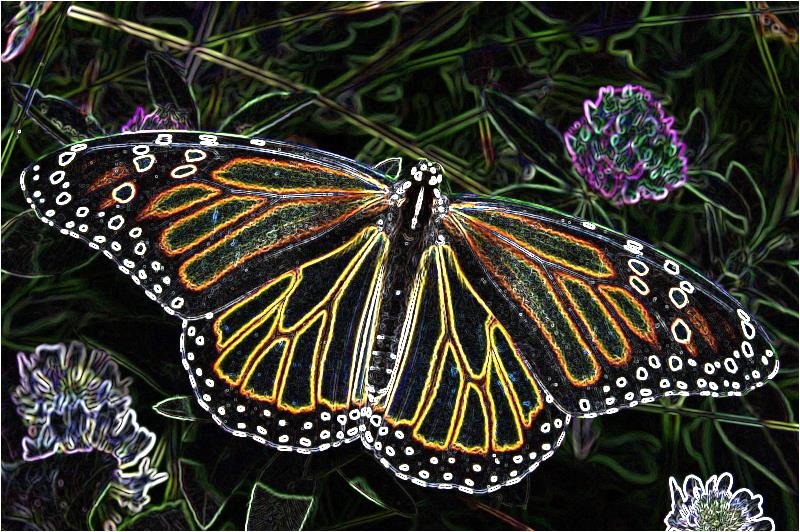
Sobel 3×3 Grayscale

Prewitt Edge Detection
As with the other methods of edge detection discussed in this article the Prewitt edge detection method is also a fairly common implementation. From Wikipedia we gain the following quote:
The Prewitt operator is used in image processing, particularly within edge detection algorithms. Technically, it is a discrete differentiation operator, computing an approximation of the gradient of the image intensity function. At each point in the image, the result of the Prewitt operator is either the corresponding gradient vector or the norm of this vector. The Prewitt operator is based on convolving the image with a small, separable, and integer valued filter in horizontal and vertical direction and is therefore relatively inexpensive in terms of computations. On the other hand, the gradient approximation which it produces is relatively crude, in particular for high frequency variations in the image. The Prewitt operator was developed by Judith M. S. Prewitt.
In simple terms, the operator calculates the gradient of the image intensity at each point, giving the direction of the largest possible increase from light to dark and the rate of change in that direction. The result therefore shows how "abruptly" or "smoothly" the image changes at that point, and therefore how likely it is that that part of the image represents an edge, as well as how that edge is likely to be oriented. In practice, the magnitude (likelihood of an edge) calculation is more reliable and easier to interpret than the direction calculation.
Similar to the Sobel filter, resulting images express a significant difference when comparing colour and grayscale images.
public static Bitmap
PrewittFilter(this Bitmap sourceBitmap,
                 bool grayscale = true)
{
    Bitmap resultBitmap =
           ExtBitmap.ConvolutionFilter(sourceBitmap,
                        Matrix.Prewitt3x3Horizontal,
                          Matrix.Prewitt3x3Vertical,
                                  1.0, 0, grayscale);


    return resultBitmap;
}
public static double[,] Prewitt3x3Horizontal
{
   get
   {
       return new double[,]
       { { -1,  0,  1, },
         { -1,  0,  1, },
         { -1,  0,  1, }, };
   }
}
public static double[,] Prewitt3x3Vertical
{
   get
   {
       return new double[,]
       { {  1,  1,  1, },
         {  0,  0,  0, },
         { -1, -1, -1, }, };
   }
}
Prewitt
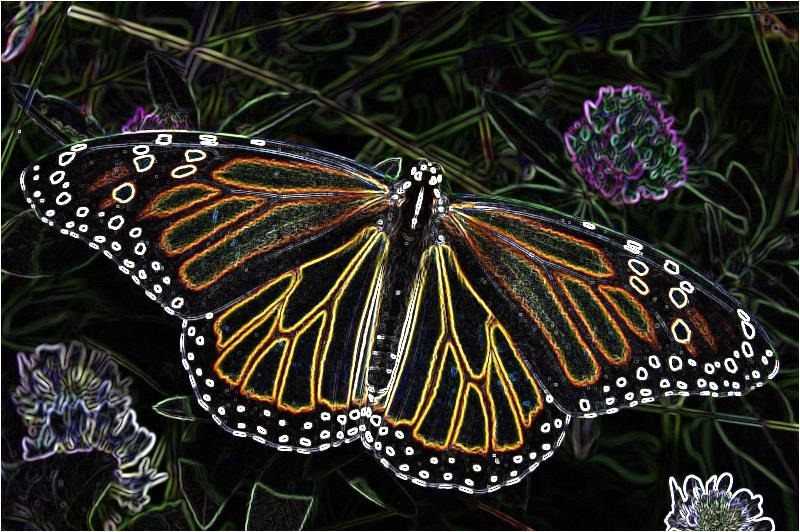
Prewitt Grayscale

Kirsch Edge Detection
The Kirsch edge detection method is often implemented in the form of Compass edge detection. In the following scenario we only implement two components: Horizontal and Vertical. Resulting images tend to have a high level of brightness.
public static Bitmap
KirschFilter(this Bitmap sourceBitmap,
                bool grayscale = true)
{
    Bitmap resultBitmap =
           ExtBitmap.ConvolutionFilter(sourceBitmap,
                         Matrix.Kirsch3x3Horizontal,
                           Matrix.Kirsch3x3Vertical,
                                  1.0, 0, grayscale);


    return resultBitmap;
}
public static double[,] Kirsch3x3Horizontal
{
   get
   {
       return new double[,]
       { {  5,  5,  5, },
         { -3,  0, -3, },
         { -3, -3, -3, }, };
   }
}
public static double[,] Kirsch3x3Vertical
{
   get
   {
       return new double[,]
       { {  5, -3, -3, },
         {  5,  0, -3, },
         {  5, -3, -3, }, };
   }
}
Kirsch
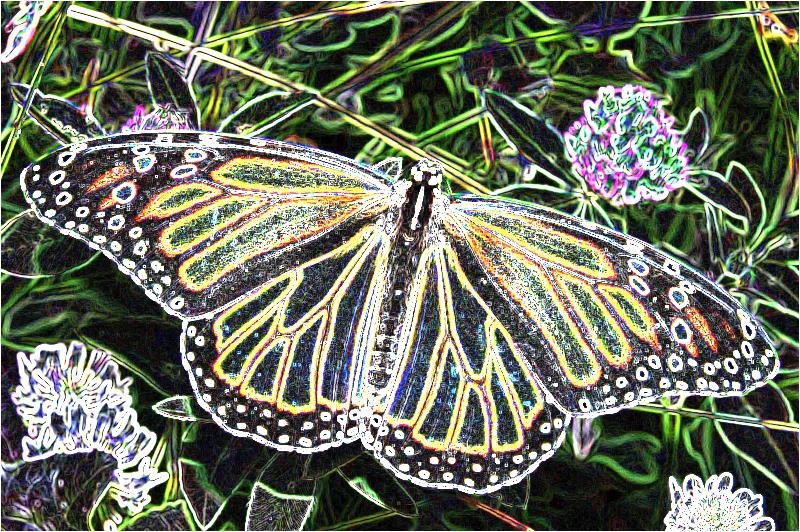
Kirsch Grayscale

Related Articles and Feedback
Feedback and questions are always encouraged. If you know of an alternative implementation or have ideas on a more efficient implementation please share in the comments section.
I’ve published a number of articles related to imaging and images of which you can find URL links here:
- C# How to: Image filtering by directly manipulating Pixel ARGB values
- C# How to: Image filtering implemented using a ColorMatrix
- C# How to: Blending Bitmap images using colour filters
- C# How to: Bitmap Colour Substitution implementing thresholds
- C# How to: Generating Icons from Images
- C# How to: Swapping Bitmap ARGB Colour Channels
- C# How to: Bitmap Pixel manipulation using LINQ Queries
- C# How to: Linq to Bitmaps – Partial Colour Inversion
- C# How to: Bitmap Colour Balance
- C# How to: Bi-tonal Bitmaps
- C# How to: Bitmap Colour Tint
- C# How to: Bitmap Colour Shading
- C# How to: Image Solarise
- C# How to: Image Contrast
- C# How to: Bitwise Bitmap Blending
- C# How to: Image Arithmetic
- C# How to: Image Convolution
- C# How to: Difference Of Gaussians
- C# How to: Image Median Filter
- C# How to: Image Unsharp Mask
- C# How to: Image Colour Average
- C# How to: Image Erosion and Dilation
- C# How to: Morphological Edge Detection
- C# How to: Boolean Edge Detection
- C# How to: Gradient Based Edge Detection
- C# How to: Sharpen Edge Detection
- C# How to: Image Cartoon Effect
- C# How to: Calculating Gaussian Kernels
- C# How to: Image Blur
- C# How to: Image Transform Rotate
- C# How to: Image Transform Shear
- C# How to: Compass Edge Detection
- C# How to: Oil Painting and Cartoon Filter
- C# How to: Stained Glass Image Filter







 Software by Default